Running a Monero node on old hardware and in an unstable environment
| The node | |
|---|---|
| Computer | Raspberry Pi 4 |
| Storage | 160 GB HDD, from a 10-year-old Acer netbook |
| Software | monerod |
| Settings | |
| Download limit | 128 kB/s |
| Upload limit | 16 kB/s |
| Blocks per fetch | 10 (default 200) |
| Database sync | safe:sync |
| Result | |
| Time to sync | 16 days |
| Received | 101.94 GB, at 72 % of the limit |
| Sent | 12.04 GB, at 68 % of the limit |
| Power cuts survived | a couple, during the first sync |
If your home suffers from occasional power outages, there's a risk that your node's blockchain will get corrupted one day, if it hasn't happened already. Although there are tools that try to salvage the LMDB database, it often can't be done, which forces you to restart the whole synchronisation, and I know that can be discouraging.
In many parts of the developing world, the internet is slow, bandwidth is limited and the power supply isn't always reliable. Add the fact that most people there don't have spare money for a dedicated 256 GB SSD, and it's easy to see why some are put off running a Monero node.
But it doesn't have to be that way. It's entirely possible to sync and run a stable Monero node on older hardware with a capped internet connection, if you're not in a hurry. You just need to start the node daemon with a few flags. These are the important ones:
| Flag | What it does |
|---|---|
--limit-rate-down XXX | limits the download speed |
--limit-rate-up XXX | limits the upload speed |
--db-sync-mode safe:sync | flushes data to the disk after every block |
--block-sync-size XX | limits how many blocks are fetched at once; useful for old hard drives (default: 200) |
I ran an experiment with a Raspberry Pi 4 and a 160 GB HDD that I scavenged from a 10-year-old Acer netbook.
I limited the download speed to 128 kB/s and had to lower the number of blocks per fetch to 10. Because the blockchain
lives on an external drive, I also added the --data-dir flag to tell the daemon where to find it.
./monerod --data-dir /media/pi/hdd160 \
  --db-sync-mode safe:sync --block-sync-size 10 \
  --limit-rate-down 128 --limit-rate-up 16
It took this node 16 full days to sync completely. After that it had no trouble keeping up with the network, and I could use it without any issues (granted, it just sits next to my router, running 24/7). It also survived a couple of abrupt shutdowns during the first sync. So if you have old hardware lying around and want to spin up a node, I say go for it! It can take a couple of weeks, but you can always use a remote node in the meantime.
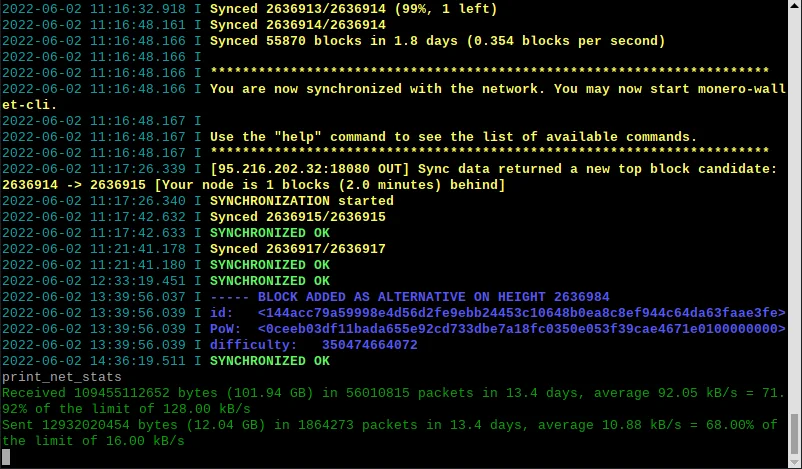
print_net_stats:
101.94 GB received and 12.04 GB sent in 13.4 days, each at about 70 % of its limit.